Food logging
Log your meals, see what they do to your glucose
Log food with a photo, a barcode, or a few words, then see the glucose response that followed. Part of Glynce Plus.
Download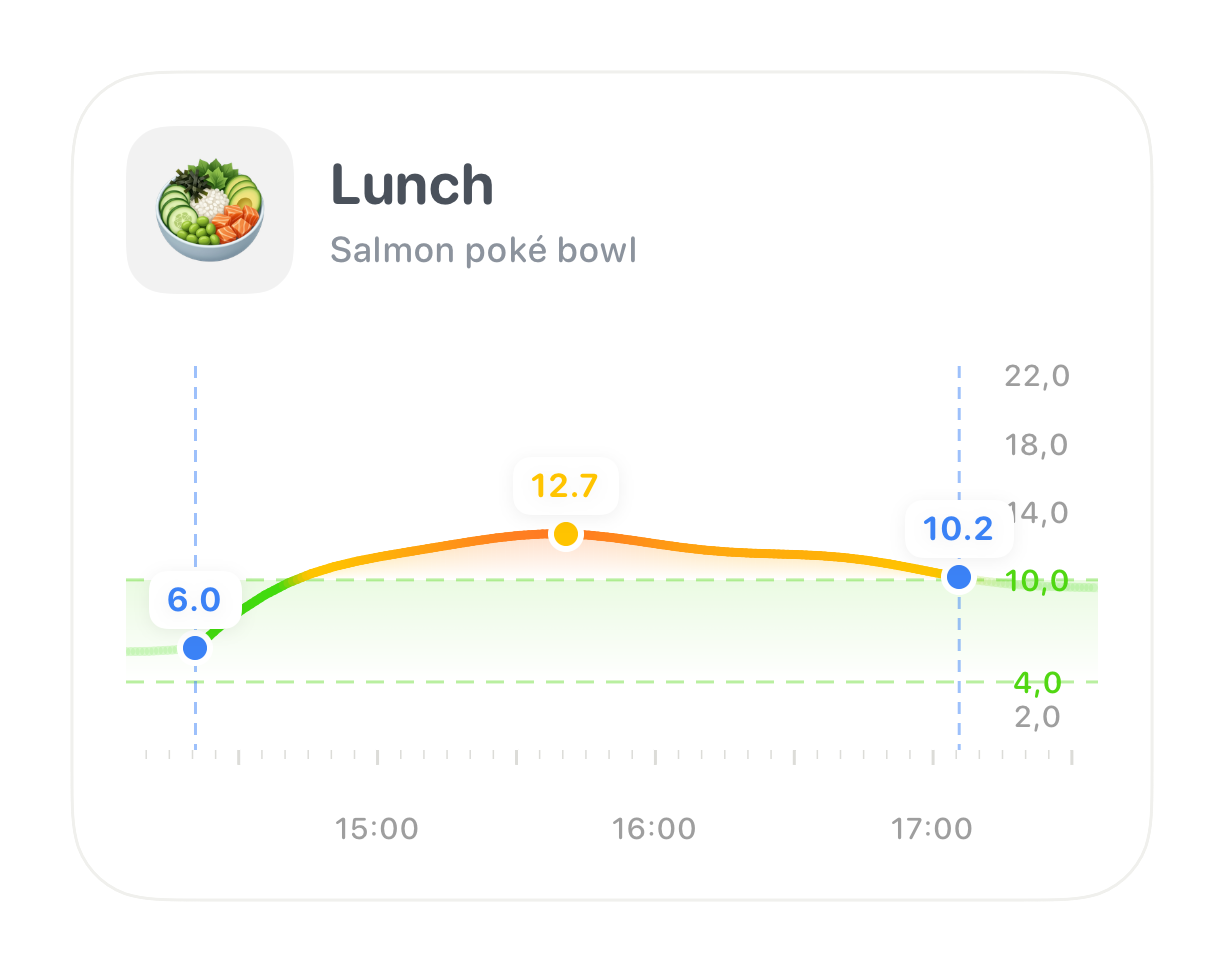
Food logging
Log food with a photo, a barcode, or a few words, then see the glucose response that followed. Part of Glynce Plus.
Download
Logging food is the part people give up on first, so Glynce gives you a way in whatever the moment allows. These ways of logging are part of Glynce Plus.
Point the camera at the packet. The barcode is read live, so anything with a label is logged in a second or two.
Snap what is on the plate for food that never had a packet, or shoot the nutrition label when a barcode comes up unknown. Either way, Glynce reads it and works out the nutrition.
No packet, no camera, no patience. Type what you ate in plain language, in whichever language you think in, and Glynce fills in the rest.
Search for it, or save your own foods and recipes once and reuse them. The meals you eat every week stop being work.
You already know roughly what you ate. What you cannot do is ask a question of a meal you never wrote down.
A food diary that only counts carbs tells you what you ate. It does not tell you what it did to you. Every meal you log lands on your glucose chart at the time you ate it, with the two hours after it measured: where you started, where you peaked, and where you ended up.
That is where the useful part is. The same pasta at lunch and at dinner can behave differently. Porridge that everyone calls slow can spike you and nobody else. You stop arguing with general advice and start reading your own glucose response.

Glynce logs carbohydrates, protein, fat, and calories, because the other three are why a meal sometimes fails to behave. A high-fat meal can flatten the rise and then push you up hours later, long after a carb-only log would have called it done.
Portions are handled properly too. Nutrition is stored per 100 g and scaled to what you actually ate, so half a portion is half the carbs rather than a guess.
Partly. Entering a meal's calories yourself, using foods you have saved, and building a recipe by hand are all free. Photographing a meal or a label, scanning a barcode, describing a meal in words, and searching the food database are part of Glynce Plus, as is the glucose response after a meal.
The photo is analysed by an AI model through Glynce's own server, which returns the food and its macros for you to check and adjust before saving. Because the work happens on a server, photo, label, and description logging all need an internet connection.
Glynce checks its own cache first, then Open Food Facts, then the USDA branded food database. If none of them know the product, Glynce offers to read the nutrition label from a photo instead, so an unknown barcode is not a dead end.
Yes. Any entry can be edited or deleted, and a meal's time can be corrected if you logged it an hour after you ate it. Correcting the time matters, because the glucose response is measured from the moment the meal started.
Yes, once you grant access. Carbohydrates, energy, fat, and protein are written for every meal, and water for every drink you log, so anything else you use can read them.
Free on iPhone
Download